Team
Job costing — estimated against actual
Every project page compares its build estimate against the hours and expenses booked to it. Only approved work counts, anything unreviewed is called out separately, and hours are compared as hours because TrailsIQ does not know what anybody is paid.
An estimate nobody ever checks against reality is a guess that never improves. Estimated vs actual sits on every project page and answers one question: is this job costing what we said it would?
Everything it uses you are already recording. Work hours and expenses have always been able to point at a project — see Work hours and expenses — and this is the screen that adds them up and puts them next to the build estimate.
What counts as actual
Only approved work. A draft expense is an intention and a submitted one is a claim; neither is a cost until a manager has approved it. Rejected entries never count.
Anything waiting on review is reported directly under the totals — "2 entries are waiting on approval" — with the hours and the money it represents. This matters more than it sounds. A job that looks comfortably under budget while three thousand pounds sits unreviewed in the queue is worse than no number at all, because it is a number somebody will act on.
To get work onto a job in the first place, pick the project when you log the hours or submit the expense. Both forms have a link field for it.
Reading the numbers
The headline is percentage of the estimate used, not a variance.
That is deliberate. A variance figure compares one total against another, which only means something once the job is finished. Three weeks into a build, "96% under budget" is arithmetically true and reads like a triumph, when what it actually says is that the work has barely started. Percent-used is honest at every point in a job's life, and it becomes the overrun figure by itself the moment it goes past 100.
Underneath, the panel shows what is left of the estimate while you are under it, and switches to over by — in red — once you are not.
The breakdown lists labour as one line and then each expense category separately, biggest first, so the thing that ate the budget is at the top.
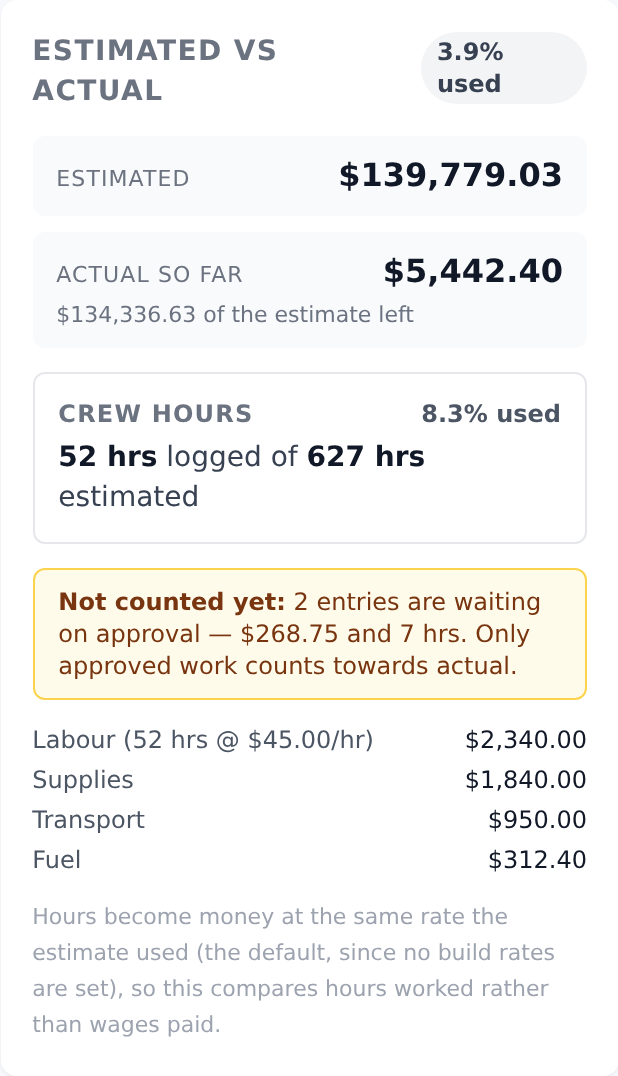
Crew hours are the honest comparison
TrailsIQ does not know what anybody is paid. So when the panel turns your logged hours into money, it uses the same hourly rate the estimate used — the one in Settings → Trail build rates, or the built-in default if you have not set your own.
Holding that rate constant on both sides is the point. It means the money comparison is measuring whether the work took the hours it was priced at, not whether your wage bill matched a guess. It is not a payroll figure and should not be handed to an accountant as one.
The Crew hours block is therefore the more trustworthy half of this screen: the estimator produces its labour in hours, your crew logs hours, and those two numbers are the same kind of thing. If you only look at one row, look at that one.
Stock drawn is not money
Inventory drawn against a job is listed as quantities, underneath the money, and is deliberately not added to it.
Two reasons. TrailsIQ does not hold a unit cost for stock items. More importantly, stock was paid for when it was bought — very often by an expense that is already counted on this same screen. Adding it again would double-count the same money against the same job.
So: expenses are what the job spent. Stock drawn is what the job consumed. Both are worth knowing and they are not the same number.
What this is not
This is a job-costing view, not accounting. It does not know about overheads, insurance, depreciation on your machine, the time somebody spent quoting, tax, or anything that never reached a work-hour entry or an expense claim.
Use it for the question it answers well — are we on track against what we quoted, and where is the money going — and keep your books wherever you keep your books.
Common gotchas
- An expense is missing. It has no project on it, or it has not been approved. Check the review queue first.
- The panel is not on the project at all. Nothing has been recorded and there is no estimate yet, so there is nothing to compare. It appears as soon as either exists.
- Actual is high but the job feels fine. Look at Crew hours rather than the money. If the hours are on track, the money line is telling you about materials, not labour.
- The rate is wrong. It comes from Settings → Trail build rates. If you have never set them, the panel says so and is using the default.
- Hours logged against a maintenance issue do not show. They are attributed to the issue, not the project. Link the hours to the project if they belong to the job.
- The percentage is small on a nearly-finished job. That means the estimate was high, which is worth knowing before you quote the next one the same way.