Trails
Handing a job to another organization
One code hands a whole job — every planned trail, its branches, waypoints, notes and photos — to another organization as their own copy in their own TrailsIQ. Planned trails only: your maintenance items, your costs and your client notes stay with you.
A trail builder's job does not end when the machine leaves. It ends when the client holds the records — the as-built lines, the branches, the notes and photos from the build, the things they will be looking after for the next thirty years.
Handing over gives them all of it in one code. They get their own copy in their own TrailsIQ, and the job on your side moves to Handed over by itself.
This is not only for builders. Any workspace with the trail planner on can send a job to another organization — a club handing a build to the contractor doing it, a land manager handing new trail to the club that will look after it. If your workspace does not track clients the panel is called Send to another organization instead, and everything below works the same way.
Only planned-trail jobs can be sent. A project can hold maintenance items as well as planned trails, and maintenance never crosses — see What stays with you. A job with no planned trails on it offers no handover at all.
Creating the handover code
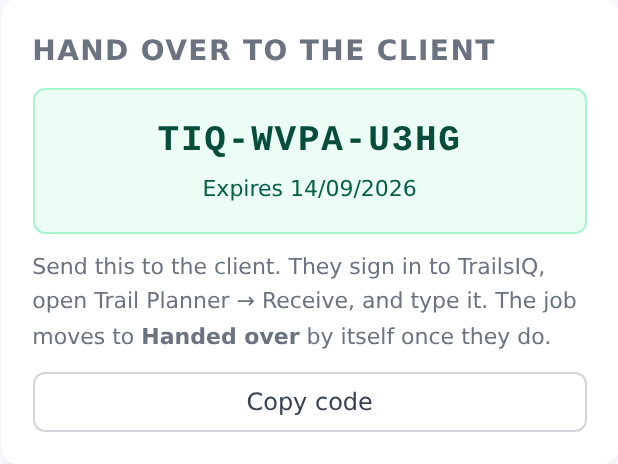
Open the job and use Hand over to the client — or Send to another organization, if your workspace does not track clients. You get a code in TIQ-XXXX-XXXX shape that is good for 30 days.
The panel appears once the job has at least one planned trail on it, and only for people who can manage the planner.
Codes are not created until you ask for one. A code is a credential — anybody holding it can take a copy of the job — so one is never minted just because somebody opened a project page.
Send it however you would send anything else: email, a message, written on the back of the invoice. The client signs in to TrailsIQ, opens Trail Planner → Receive a trail, and types it.
The code is single use. Once it has been accepted it cannot be used again, by them or anybody else, and you cannot withdraw it — the copy belongs to them at that point.
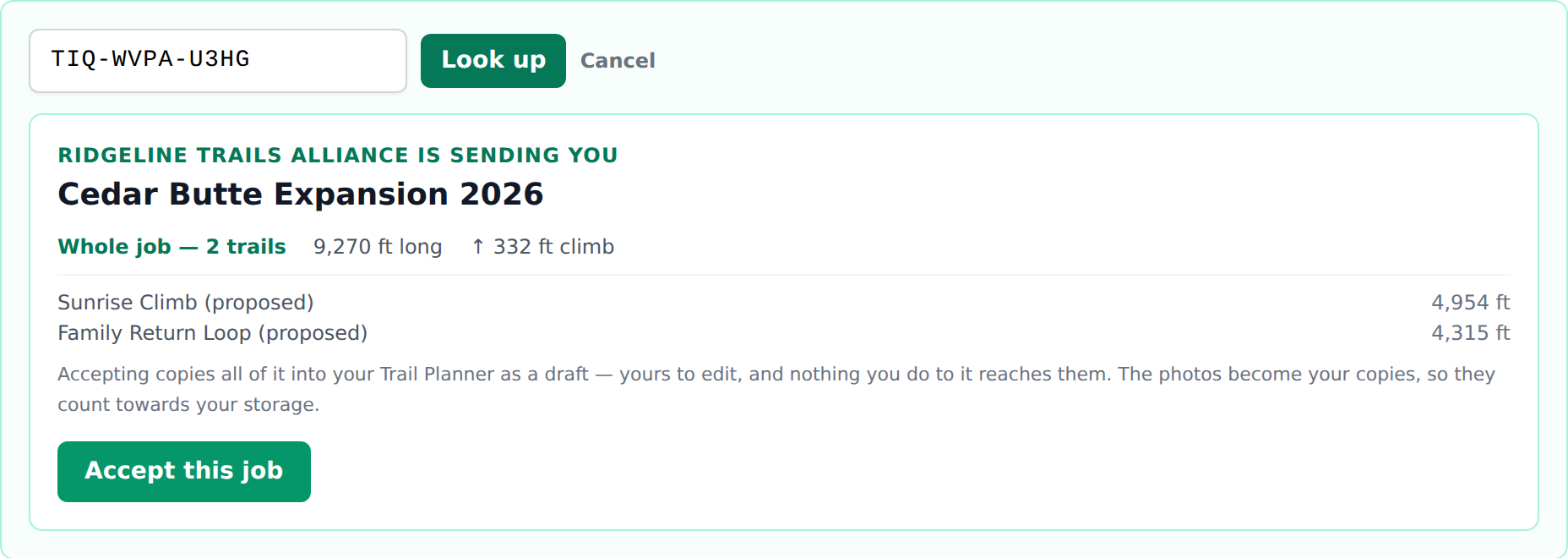
What the client receives
Everything on the job that describes the ground:
- Every planned trail in the project, with its alignment and analysis
- Branches — spurs, reroutes, options — attached to their parents the same way
- Waypoints and notes recorded during planning and building
- Photos attached to the trails
They arrive grouped as a project in the client's workspace, named the way you had it, so the trails land as one job rather than as loose lines they have to work out the shape of.
Their copy is theirs outright. They can edit, rename, export or delete any of it, and nothing they do reaches back to your records.
What stays with you
Three things deliberately do not cross, and it is worth being clear about them because the mistake would be permanent:
Your maintenance items. A project can have maintenance tasks linked to it as well as planned trails, and only the trails are a handover. A maintenance task is work your crew does on ground you hold — it would arrive in their queue unassigned, undated, and reported by somebody who is not their member. The handover panel tells you how many linked items are staying before you create the code.
Your money. The build estimate, the hours, the expenses, everything on the job-costing screen. What a job cost you to deliver is your business, and handing your margin to the customer along with the trails is not something you could take back.
Your client record. The contact details and especially the internal notes on the client — access arrangements, who signs off, whatever you have written about working with them. The client is not their own client, and that record is your contact book.
The receiving project also starts at the top of a fresh pipeline rather than arriving marked Handed over. To you the job is finished; to them the trail is now theirs to look after, and describing their new asset with your history would be the wrong story.
If the client has no TrailsIQ yet
They need an account to receive a handover, and a free one is enough.
Point them at the signup page and have them create a workspace for their organization, picking Trail organization when asked what their team does. They will land in a workspace built for looking after a network, which is exactly what they are about to be doing. Then send them the code.
This is worth doing even when the job is small. A client whose trails are in TrailsIQ can report a problem on them, track a condition, and come back to you with a record rather than a phone call — and the next job starts from something rather than from nothing.
Handing over one trail instead
The per-trail transfer still exists and is unchanged: open a planned trail and use Send to another organization. Same kind of code, same 30 days, same single use.
Use it when you are giving somebody one line rather than a job — a reroute you designed for a club, a single connector, a favor. Use the job handover when the thing you are giving them is the work you were paid for.
A branch cannot be sent on its own either way. Send the parent and its branches go with it.
Common gotchas
- No handover panel on the job. Three things have to be true: the trail planner is on for the workspace, you can manage the planner, and the job has at least one planned trail. A maintenance-only job never shows one — there is nothing on it that can cross.
- "This job has no planned trails on it yet." Same cause, from the other end. Link the planned trails to the project first. Linking maintenance items does not make a job sendable.
- The maintenance items did not arrive with it. They are not meant to. See What stays with you.
- The client says the code does not work. Check it has not already been used, and that they are typing it into their own workspace — a code cannot be accepted by the organization that made it.
- The job did not move to Handed over. That happens when the client accepts, not when you create the code. Until they type it, nothing has crossed.
- They want it again after accepting. Create a second code. The first is spent, and the copy they already have is theirs to keep.
- Photos count against their storage, not yours. They receive their own copies of the files.