Maintenance
Checklists
The work that comes round every year, written down once: where each task needs doing (once, every trail, every structure, or the places you pick), starting a fresh copy each season, checking things off, what flagging a line files for you, how it behaves with no signal, using one for a machine service, and repeating one on a schedule.
Every trail organization has work that comes round every year: the spring opening, the fall close-down, the check before a race. A checklist is that list written down once, so it stops living in one person's head and becomes something a crew can pick up, check off and hand over half-finished.
Three words cover all of it. A checklist is the list you write. Each line on it is a task. When you start a checklist you get a fresh copy for this season, which is in progress until everything on it is checked off and then finished.
Writing the list
Maintenance → Checklists → New checklist. Give it a name, a season if it has one, and how often it repeats if it comes round on a schedule (see On a schedule below). The season is a label. Nothing starts itself on a date, because an empty copy appearing every April whether or not anybody went out is how a team learns to close them without reading.
Then press Edit and add the tasks. Each one has what needs doing ("Clear the drainage") and, if it helps, what done looks like ("water runs off the tread at every drain dip"). The crew sees that line when they open the task.
Where does this need doing?
Every task answers that one question, and the answer decides how many checkboxes it makes:
- Just once: one checkbox. "Restock the map box at the trailhead."
- Every trail: one checkbox per trail. "Walk the trail and note winter damage" on a system with forty trails is forty things to check off, and this is what lets a crew hand it over half done and have that mean something.
- Every structure: one checkbox per bridge, gate, sign and so on. Pick a kind to keep it to, say, bridges only, and press On all trails to keep it to the structures on certain trails. "Check the deck boards" can then cover the bridges in one valley and not the ones across the ridge. Leave every trail box clear to cover all of them.
- Only the ones I pick: exactly the places you tick, in two tabs, Trails and Structures. Any mix works. "Clear the drainage" can be three trails and two culverts, and nothing else.
Under the task a green line says what you will get, for example This adds 5 checkboxes: Ridge Loop, Creekside Connector, Lower Flow, and the structures Mill Creek Culvert and Beaver Pond Boardwalk. Each task on the list shows its count, and the bottom of the editor shows the total. A checklist with a task you set to Only the ones I pick and then picked nothing for will not save, and says which task it is.
Writing one in the field app
You can also write a checklist on your phone: Checklists → New checklist. Give it a name, choose whether it repeats, and add the tasks, each with the same four answers to Where does this need doing?. For Only the ones I pick, tap Pick places and tick trails and structures from the two tabs. Save checklist saves the name, the schedule and every task together, and the new list is ready to start straight away.
Saving needs a connection, the same as starting one. Changing a checklist you already have, its wording, its tasks or its schedule, is done on the dashboard.
Writing the list needs the Triage maintenance reports permission. Checking things off does not; see below.
When a task finds nothing
A task can end up with nowhere to go. You kept it to bridges and this area has none, or the places you picked are not in the area you started the checklist for. It still appears, as a single line saying which of those happened, rather than disappearing. A crew reading a shorter list would have no way to know something was left out.
The reasons are worth telling apart. "None of the places this task covers are in this area" is not a problem: a spring opening in one valley can skip a task about another. "The places this task was picked for have been deleted" is one to go and fix, because the task will find nothing in any copy until you pick new ones.
Starting a checklist
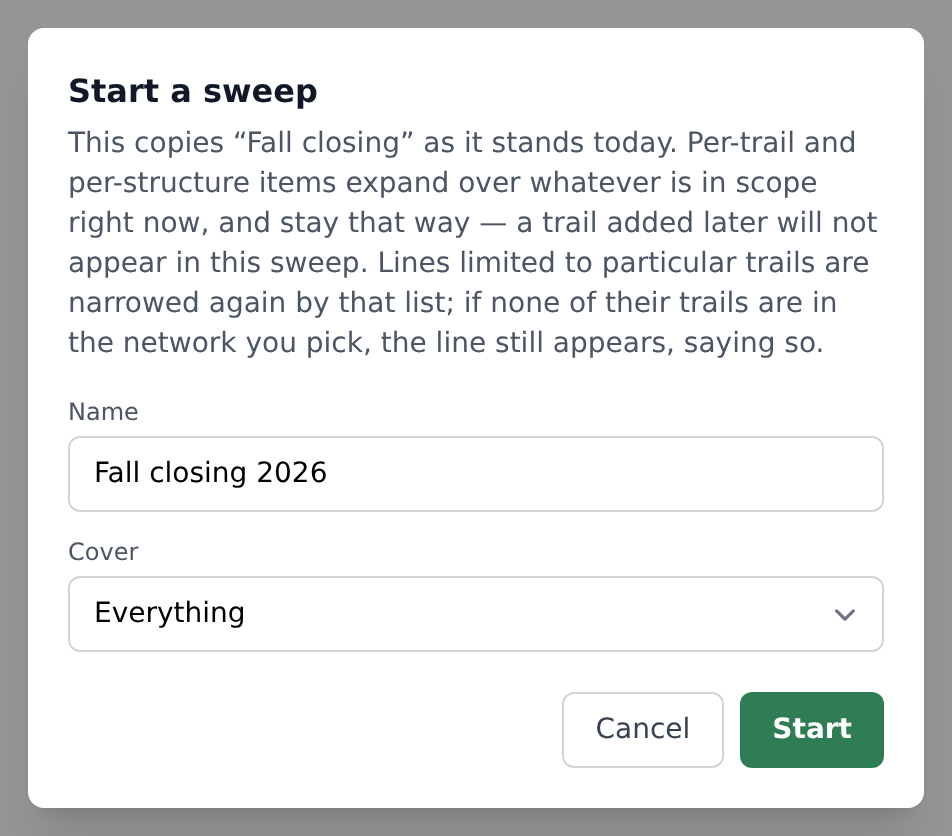
Start takes a copy of the list as it stands today. Name it (leave the name empty and it uses the checklist's name and the year) and choose Which area?: all trails, or one network.
You can start one from either place: Maintenance → Checklists on the dashboard, or Checklists → Start a checklist in the field app. The phone is usually where you want it, because a spring opening tends to begin at a trailhead rather than at a desk. It takes the same permission as writing the list, so a volunteer sees the checklists in progress and not the button.
Starting one needs a connection, and the app says so. The list of checkboxes is built on the server from the trails and structures in the area, so there is nothing to start until it can reach us. Checking things off on a checklist already started works with no signal at all, which is the half that matters on the hill.
Two things about that copy are worth knowing before you rely on it.
It keeps the wording it was started with. Rewording a task next winter changes what the next copy asks for and nothing about what this one recorded. This is the sort of record somebody may read a year later to establish what was checked and when, and it has to stay the way it was walked.
Its places are fixed the moment you start. A task for every trail covers the trails that exist right now. A trail added in June does not appear in April's copy, so a finished checklist stays finished.
Checking things off
The same screen is on the dashboard and under Checklists in the field app.
At the top, Up next shows the first thing nobody has checked off yet, with a big Check off button. Under it the whole list is grouped two ways, and a switch flips between them:
- By place puts every task for one trail together, including the structures on that trail, so a crew can walk one trail at a time and finish it. Just-once tasks sit at the end under Anywhere. The field app opens this way and remembers your choice.
- By task puts each task together with its places underneath ("Clear the drainage, 1 of 5"). Good for a crew doing one job everywhere.
A group folds away when everything in it is checked off. Tap its header to open it again.
Tap a box to check it off as done. Tap it again to take that back. The ⋯ beside each line opens everything else:
- Done: checked off, nothing more to do.
- Not needed this time: you looked, and it does not apply this year. The gate is already off its hinges and being rebuilt; the trail is closed. This counts as checked off.
- Needs work: you looked, and it is not right. This checks it off and files a maintenance task. See below.
- A note and photos. Type what you found and add up to four photos. They go with whichever answer you tap.
Anyone on the team can check things off. Writing the list is a manager's job and walking it is the crew's, and a checklist only two people can answer is a checklist that does not get done.
Each line's photos show on the line. Open the ⋯ to see them with a × on each, and remove one that came out wrong. A finished checklist is a record, so a manager reopens it first.
When the last box is checked
A checklist finishes itself. There is no button for it: the moment nothing is left to check off, it closes and stamps the date. A checklist somebody has to remember to close is one that sits open all summer, and one that could be closed with boxes still empty would say work was done when it was not.
Needs work counts as checked off. You looked, it is not right, and the job has moved to the maintenance queue, so flagging the last open line finishes the checklist just as checking it would.
In the field app a finished checklist moves into Finished recently, and the app tells you it has happened and what it raised. It stays there for a fortnight so you can read back what you just walked. After that the dashboard is where it lives, along with every one before it.
If you answered something wrongly, open its ⋯ and tap the answer you meant. A line can be answered any number of times, and a line you had flagged updates the maintenance task it raised rather than filing a second. Undo (or tapping a checked box) puts it back to unanswered, on the phone as well as on the dashboard, with or without signal. Undoing the line that finished a checklist reopens it.
Undoing a Needs work line does not withdraw the maintenance task it filed. By then somebody may have triaged it, commented on it or assigned it to a project, and a checklist is not the authority on work that has left it. Close the task from Maintenance if it should not have been raised. Flagging the line again picks that same task back up; see What "Needs work" does below.
What "Needs work" does
Marking a line Needs work files a maintenance task for it and links the two, so the thing you found is in the queue before you have walked to the next one. The task carries your note and your photos, is typed as coming from a checklist, and names what and where: "Boulder Creek Connector — Clear the drainage".
Answering the same line again updates that task rather than filing a second. Changing your mind and marking the line Done afterwards unlinks it and leaves the task alone. By then somebody may have triaged it, commented on it, or fixed it.
Flagging that line again later picks the same task back up rather than filing another. This is the sequence it exists for: you flag a blocked drain, somebody clears it while you are standing there, you mark the line Done, and next season it is blocked again. One task, with both visits on it, rather than two with the same title.
The exception is a task somebody has already called finished. If it has been resolved, or moved to pending review because a crew member reported it fixed, a fresh flag is a new finding rather than more of the old one, so it gets its own task and the closed one is left exactly as it was.
You can find everything a checklist turned up from the Maintenance list: filter by type From a Checklist.
When it is finished
A checklist closes itself the moment nothing is left to check off, and reopens if you take an answer back afterwards.
Finished checklists stay on the checklists page under Finished, and deleting the checklist they came from does not delete them. They keep their own name and their own wording, so what was checked in April survives whatever happens to the list in November.
With no signal
The field app keeps every checklist in progress and the lines of any you have opened, so you can work through one out of signal. Answers, notes and photos are queued on the phone and send themselves the next time it has a connection. The line shows your answer straight away either way, and a photo still waiting says so under the line.
A checklist you have never opened on that phone has nothing to show. Open each one you plan to walk while you still have signal.
You can see everything queued under the sync icon in the field app header; a waiting answer is listed there as Checklist answer.
A machine's service
A checklist can also be the service a machine gets every time it comes due: sharpen the chain, clean the air filter, check the brake. Write it once, then open the machine in the field app's inventory, tap the pencil and pick it under Service checklist. One checklist can serve every machine of the same kind.
The machine's page then shows Start service. Anybody on the crew who can see the inventory can start it, not only managers, because the list was chosen when it was linked. The copy is named for the machine and its hour reading, such as Stihl MS 261 · service at 146 h, and every task on it is one checkbox, whatever Where does this need doing? says, since a service is about the machine in front of you.
- Checking off the last task logs the service. It is recorded on the machine at the hour reading taken when the service started, shows as Last serviced on its page, and moves the next service on by the machine's interval, exactly as closing a Service / Repair task does.
- Needs work files the problem on the machine, so it shows under that machine's tasks. Fixing it later does not count as another service.
- Only one service of a machine runs at a time. While one is in progress the button reads Continue service and opens the same copy, so two people cannot log the same service twice. Taking an answer back and finishing again does not log it twice either.
A service counts in hours of use, so it works on machines with an hour meter and a service interval set. Starting one needs a connection; checking it off works offline like any other checklist.
On a schedule
Some lists come round on the calendar rather than with the season: the trailhead check every two weeks, the gate inspection every month, the fire extinguisher every year. Set Repeats when you create the checklist, or later under Edit at the bottom of the list: pick days, weeks, months or years, then how many, and press Save schedule.
The next due date counts from the day the last copy was started, not finished, so a check that takes a few days to walk does not push every later one back. "Every month" from the 31st lands on the last day of a shorter month rather than spilling into the next one. A checklist that has never been started is due straight away.
- The checklists page shows where each one stands: its interval, and Due today, Due Oct 14, 2026, or Overdue by 3 days. On a schedule down the side lists them all, soonest first, with a Start button on each.
- The field app lists the due ones above Start a checklist, under Due to start, for anybody who can start one. Tapping Start opens the usual start screen with that checklist already picked.
- Managers get one notification when a checklist comes due, on their phone and in the notification list, not before 7 in the morning your organization's time. It is sent once per due date, not every day it stays overdue. Anybody who would rather not get it can turn off Checklists due in the field app's notification settings.
- While a copy is in progress it is not due, whatever the date. Starting the next one resets the count.
Nothing is started for you. The due date is a reminder to a person, who still decides to start it, so a copy in the list is always one somebody meant. A machine's service from the same checklist does not count as the checklist being done, since it runs on that machine's hours instead.
Your organization's time zone decides which day a copy was started on. Set it under Settings → Organization details if the dates look a day out.