Trails
Contracts for won jobs
A contract assembled from the job — parties, trails, price and payment schedule — with your own terms under it, signed by you and then by the client from a link with no account. Frozen and fingerprinted at signing, downloadable as a PDF by both sides, and workable end to end from the field app.
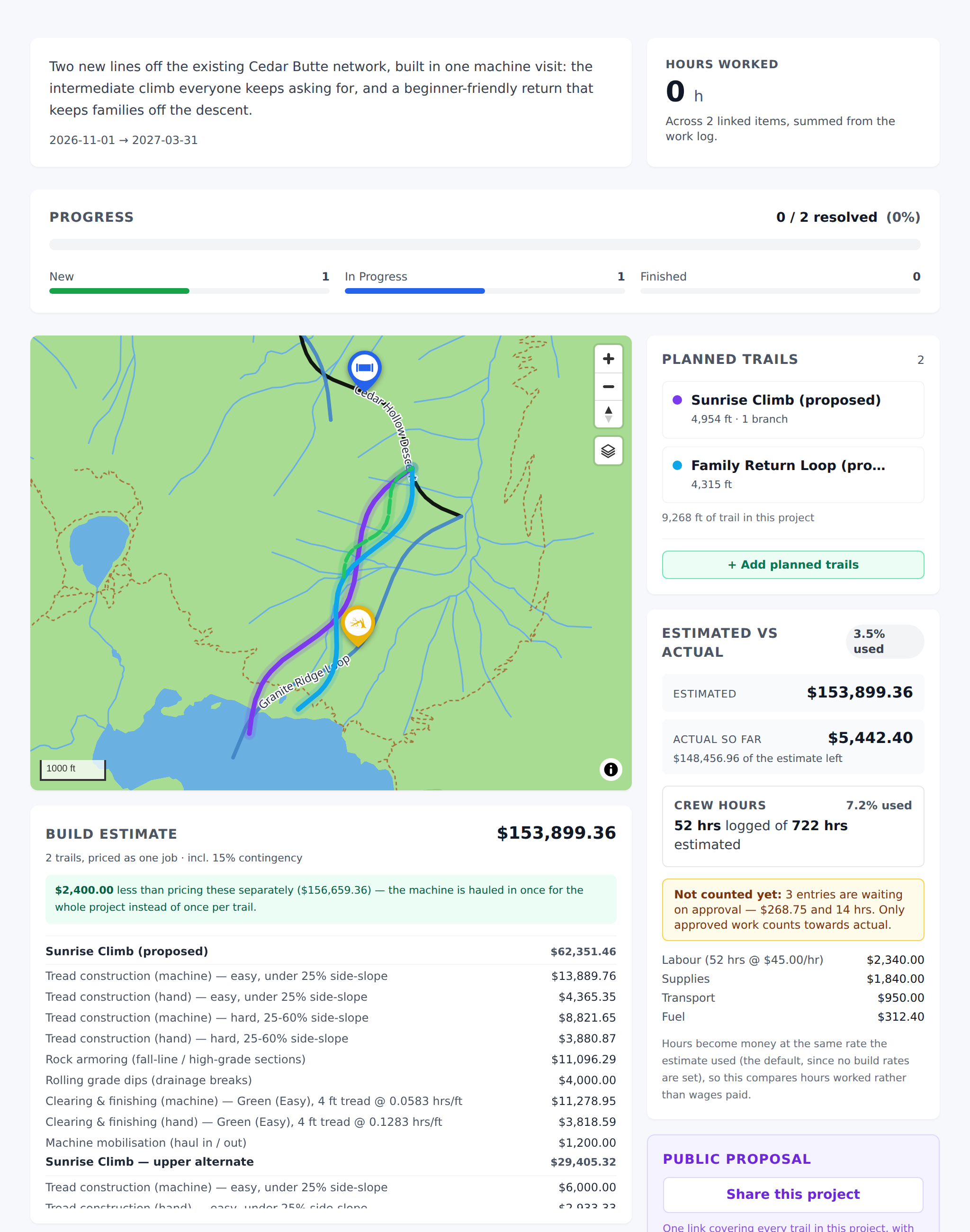
When a job moves to Won, the project page grows a Contract button. It assembles a contract from what is already in the job — the parties, the trails, the price, the dates — puts your terms under it, and gives you something the client can sign from a link.
TrailsIQ does not write the legal wording, and will not. Terms written for every customer would be wrong in most states and every other country. Yours go in once, under Settings, and the same ones are printed on every contract you send. Have them reviewed before you send the first one.
Before the first one
Contracts are a workspace module, off by default for a trail organization and on for a builder. If the Contract button and the fields below are not there, switch them on under Settings → Workspace modules. See Workspace modules.
Then two things under Settings → Organization details, filled in once:
- Legal entity name. The name that signs, which is rarely the name customers use. Leave it blank and your organization name is used instead.
- Registered address. Printed in the Parties block. A contract naming a party with no address is weaker than one that names it.
- Your standard numbers. Warranty period, payment days, cure period, governing state. Used wherever your terms name them — see Placeholders in your terms.
- Your contract terms. Change orders, site access, insurance, warranty, dispute resolution — whatever your own lawyer drafted. Pasted in as plain text and printed verbatim.
Without terms, sending is refused rather than sending a schedule with nothing under it. A price list somebody signed is not a contract.
What the contract says
Everything except the terms comes from the job, so it cannot disagree with it:
- The parties — your legal name and address, and the client from the job.
- The scope — the planned trails under the project, by name.
- The price — see The price, and what it promises below. This is the part that needs a decision from you rather than a number from the estimator.
- The payment schedule — deposit, milestones, retainage. The one part nothing can work out for you, because it is the part that gets negotiated.
A job with no client, or with no priced estimate, cannot produce a contract. Both take a minute to fix and are much worse discovered by the person receiving it.
The price, and what it promises
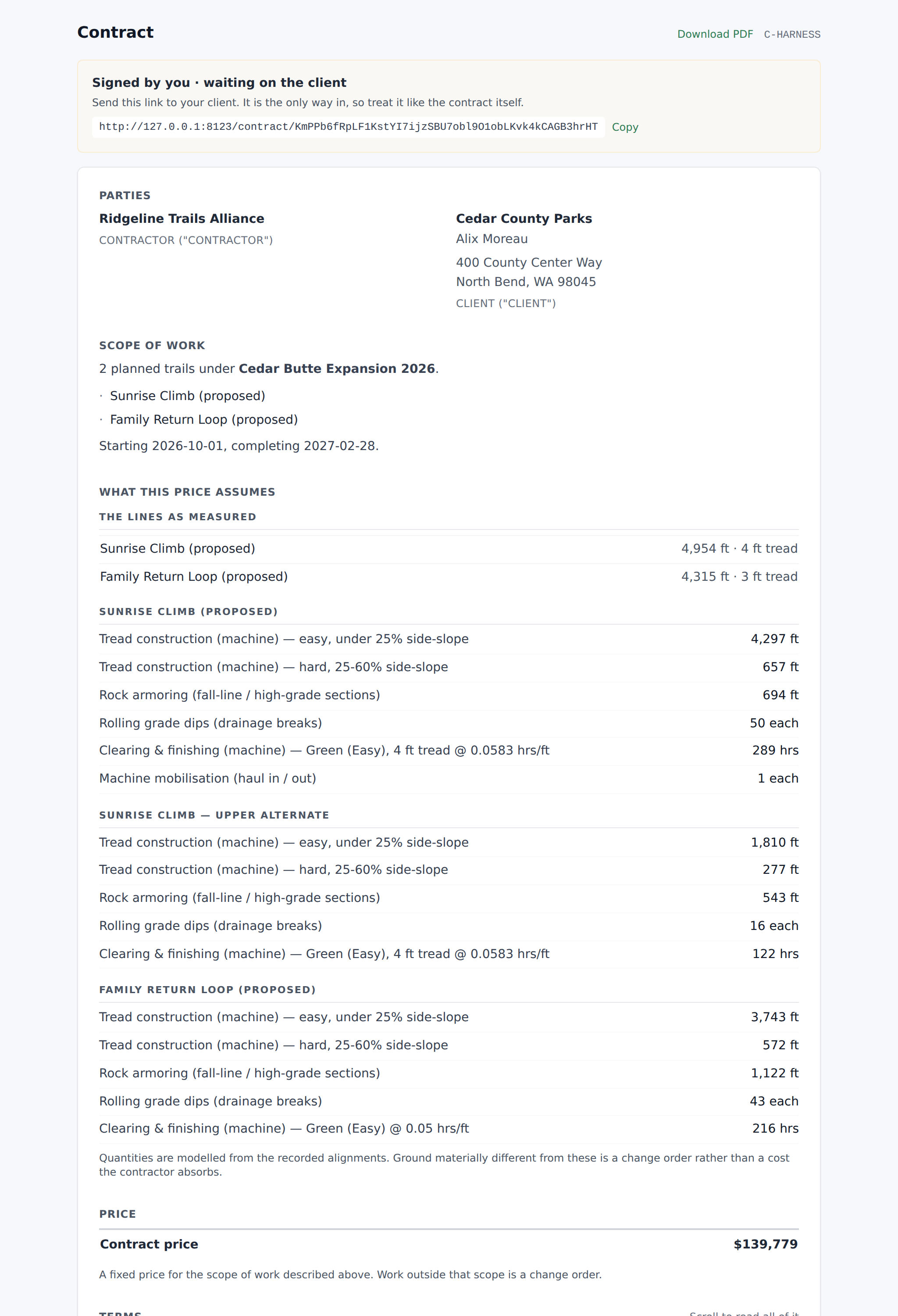
The build estimate gives you a number. It is a starting point, not the commitment — round it, add margin, drop it to win the job. Whatever you type in The price on the contract is what the client signs for, and every percentage on the payment schedule is worked out against it. Leave it blank to use the estimate.
Then say what that price is, because that decides the sentence printed under it — and that sentence has to agree with your own terms:
- Fixed price — one price for the scope above. The cost breakdown is not shown to the client: a fixed price is a price, and itemizing your own working invites a line-by-line negotiation over figures that stopped being the deal the moment a number was agreed. The estimate's contingency is inside the price and is not shown as a row — on a fixed price it is your risk buffer, not something the client is buying, and itemized it is the first thing they ask you to take off.
- Not to exceed — a ceiling. Work is billed as performed, anything unspent is not charged, and going over needs a signed change order. The breakdown is shown, because a ceiling with nothing behind it is a number you made up.
- Estimate — not a fixed price; actual cost depends on what the ground turns out to be. The breakdown is shown.
Check this against your terms. Most standard trail-building terms say something like "unless otherwise stated in the Agreement, the project is billed at a fixed price." This contract is the Agreement, so this setting is what states otherwise. A contract whose terms say fixed price while the line under its total says this is a model is ambiguous — and ambiguity in a contract is generally read against whoever wrote it, which is you.
Whichever you pick, the estimator's own total is kept on the contract behind the scenes, so you can always see afterwards what the model thought and what you actually agreed.
Tax
Set your rate, what you call it and your registration number in
Settings → Organization details. With a rate set, a contract prints
three lines instead of one: the agreed price excluding tax, the tax
itself with the rate beside it, and the total including tax. Your
registration number appears under your address, where an accountant
looks for it. Proposals do the same.
Leave the rate blank if you don't add tax. Blank means no tax
lines at all, which is not the same as a rate of zero — zero is a rate
you chose and prints a row saying so.
The price you type stays the price before tax, and every
percentage on the payment schedule is worked out against it. So is the
build estimate, everywhere it appears in TrailsIQ: tax is a line on
the documents your client reads, not a second version of every number
in the product.
A signed contract keeps the rate it was signed under. If you
register later, or a rate changes, contracts already signed re-open
exactly as they were. Only new ones pick up the new rate.
What the price assumes
Standard trail-building terms usually carry a line like "the Contract Price assumes conditions described in the Agreement." On a fixed price that clause is doing real work: it is what turns the ground was not what we thought into a change order rather than into a cost you absorb. It only works if the contract actually describes those conditions — and a scope of trail names and lengths does not.
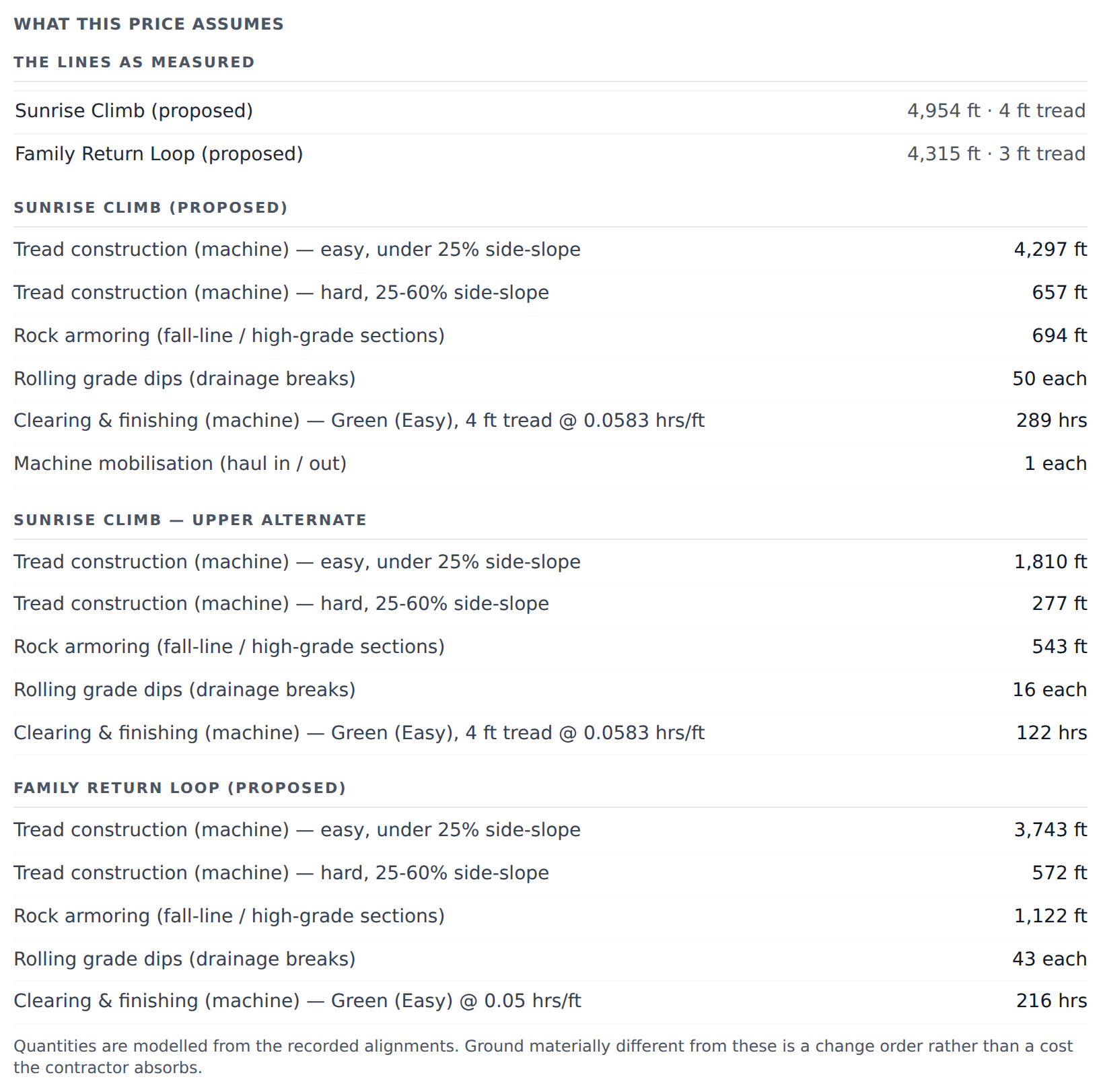
So every contract carries a What this price assumes section, in two halves.
The measured half is automatic. Length and tread width per trail, and the quantities the estimate was built from — feet of machine-cut bench, feet of hand work, rock armoring, drainage dips, stream crossings. Nobody types them and they cannot drift from the number they explain.
Money is stripped from that half deliberately, and it is why a fixed price can hide its cost breakdown and still show this. Your rates and costs are your working; the quantities are the scope, and the scope is what a change order gets measured against. Stating "2 stream crossings" commits nothing about price and everything about what happens when there turn out to be five.
The written half is yours. Access route, staging area, who pulls the permits, the season you can work, what is excluded — none of that is anywhere in TrailsIQ and none of it is derivable. Write it once under Settings → Organization details → Standard assumptions and exclusions and it is copied onto every new contract as a starting point, then edited per job. Placeholders work here too.
Like the terms, it is frozen when the contract is sent — changing your standard text next year cannot move what somebody already signed.
The payment schedule
Deposit, milestones, retainage. The one part of a contract nothing can work out for you, because it is the part that gets negotiated.
Each row is written either as a percentage or as a fixed amount — tap the % / $ button to switch. Both are ordinary: "20% on signing" and "$5,000 on signing" mean the same thing to the two people agreeing them, and which one gets said depends on the conversation. A percentage is resolved against the contract total the moment the contract is signed, and both numbers are printed on it: the percentage is what was negotiated, the dollars are what gets paid.
Under the rows you will see what the schedule adds to against the contract total. That is a fact to look at, not a rule — retainage, holdbacks and a deliberately part-billed schedule are all normal — but a schedule adding to 90% of a job is usually a typo, and nothing else on the screen would tell you.
Each row can also be marked Deposit, Progress payment or Final payment. That is not decoration: it is how your terms name the row. See below.
On an estimate or a not-to-exceed, one row is marked ≈ — the one that settles the balance.
A deposit is due on signing, before a spade goes in the ground. The only number that exists that day is the estimated total, so a deposit of 25% of it is a fixed, knowable, payable sum. The same holds for anything due mid-build. Only the row marked Final payment can move, because it is the only one due after the final number is known — and that is how a build is actually billed: a deposit, some draws, and a balance that absorbs whatever the ground turned out to be.
So the schedule reads "Deposit · 25% of the estimated total — $2,374" with no mark, and "Final payment · 75% of the estimated total — ≈ $7,122" with one, under a line saying the final payment settles the balance and everything above it is fixed. On a fixed price nothing moves at all and every share is stated against the contract price. A row written as a fixed amount is never marked — a stated sum is a stated sum whatever the total does.
If the price is an estimate or a not-to-exceed and no row is marked Final payment, the draft says so: without one, every instalment is a fixed sum and nothing absorbs the difference between the estimate and the final invoice.
Placeholders in your terms
Your terms are the same on every contract, but some of the numbers in them are not. Write {{deposit_percent}} where the deposit percentage goes and it is filled in from that job's schedule.
Two forms:
{{name}}— replaced with the value.{{#name}}…{{/name}}— the text between is dropped entirely when that value is empty. This is how a job with no progress payment loses that bullet, instead of printing "…% due at ." with a hole in it.
Substitution happens when the contract is sent, not when it is read. A signed contract keeps the words it was signed with — change your standard warranty period next year and every contract already out there still says what it said.
A contract refuses to send while any placeholder in it has no value, and tells you which. A clause reading "within days of Contractor's invoice" is worse than a contract that failed to send, because that one gets signed. The refusal also catches a misspelled name — {{warranty_dayz}} is not something Settings can fix, so it is named separately.
The full list is under the terms box in Settings, and it splits in two:
- From the job —
{{company_name}},{{client_name}},{{project_name}},{{contract_reference}},{{contract_price}}, and the schedule ones:{{deposit_percent}},{{deposit_amount}},{{progress_payment_percent}},{{progress_payment_amount}},{{progress_milestone}},{{final_payment_percent}},{{final_payment_amount}}. These are read off the contract and cannot be typed in anywhere. That is deliberate: a number with two homes is how the prose and the schedule printed under it come to disagree, and nobody notices, because both halves look deliberate. - Your standard numbers —
{{final_payment_days}},{{warranty_days}},{{breach_cure_days}},{{late_fee_monthly_percent}},{{governing_state}},{{entity_type}}. Typed once under Organization details. Nothing in TrailsIQ could know these; they are decisions your business makes.
{{governing_state}} is worth using even if you only ever work in one state. Terms usually name the state four or five times — governing law, the courts, the interest cap, an agency — and the day a job crosses a line, that is five edits buried in legal prose, one of which gets missed.
Who "Contractor" and "Client" mean
Standard terms are written in shorthand: Contractor will perform…, Client is responsible for…. They define the shorthand; they do not name the parties.
The contract itself does that, at the top, in the Parties block — your legal entity name and registered address on one side, the client from the job on the other, each labeled with the shorthand the terms below then use. It is on the screen the client signs, and on the PDF both sides keep.
So terms that say "between {{company_name}}, a {{governing_state}} limited liability company ("Contractor"), and the client identified in the Agreement ("Client")" are correct here: the Agreement is this document, and it identifies both.
Fill in your registered address under Organization details. A contract naming a party with no address is weaker than one that names it.
Signing, and why it is one button
You sign and open it to the client in a single action. There is deliberately no way to send an unsigned contract: it would be an offer nobody had committed to, and it would leave you able to edit the document while the client was reading it.
Signing freezes the document. From that moment nothing about the job changes it — not a new rate, not another trail, not a re-run estimate. The contract keeps the numbers it was signed with, which is the whole reason it is worth having.
If you have drawn a signature under your profile, it appears on the contract. If not, your typed name is used.
Sign your own name, not the company's. A company cannot hold a pen. The party to the contract is the legal entity from Organization details; a person signs on its behalf, and the signature block on the contract says so:
CEDAR COUNTY TRAILWORKS LLC
By  Sam Rivera
    Member
Your title is worth filling in even though it is optional. It is the capacity you sign in, and it is what shows on the face of the document that you signed for the business rather than in a personal capacity — which is most of the reason the business is a separate entity at all. Owner, Member, President, Managing Member: whatever your operating agreement calls you.
The same holds on the client's side. If the client is a parks department or a land trust, a person signs for it, and their signing page says so.
The client's side
They get a link. No account, no signup — the person signing is often a landowner or a parks officer who has never used TrailsIQ, and a signup in front of the document would cost you contracts without adding anything.
They read the same document you did, type their name, optionally draw a signature, and tick a box agreeing to sign electronically. Their name, the time, and the network address they sign from are recorded with the contract, and the page tells them so before they sign.
Once both parties have signed, the link becomes their copy. Returning to it later shows the signed contract rather than asking again.
You are told the moment they sign. A push to the field app, a notification in the app, and an email with the reference, the price, who signed and when. It goes to everyone on your team who can manage jobs — the people who could have sent it in the first place — and there is a Contracts signed switch under notification settings for anyone who would rather not have it.
If the client gave an email, they get their own copy too — with the signed PDF attached, not just a link. The email field on the signing page stays optional: a signature is valid without one, and a required field in front of somebody about to commit is a reason not to.
The push deliberately carries no money. It reads "Cedar County Parks signed Cedar Butte Expansion" and nothing else: a lock screen is read by whoever is standing nearby, and a contract total is the one number on that document that is nobody else's business. The figure is in the email and one tap away in the app.
The fingerprint
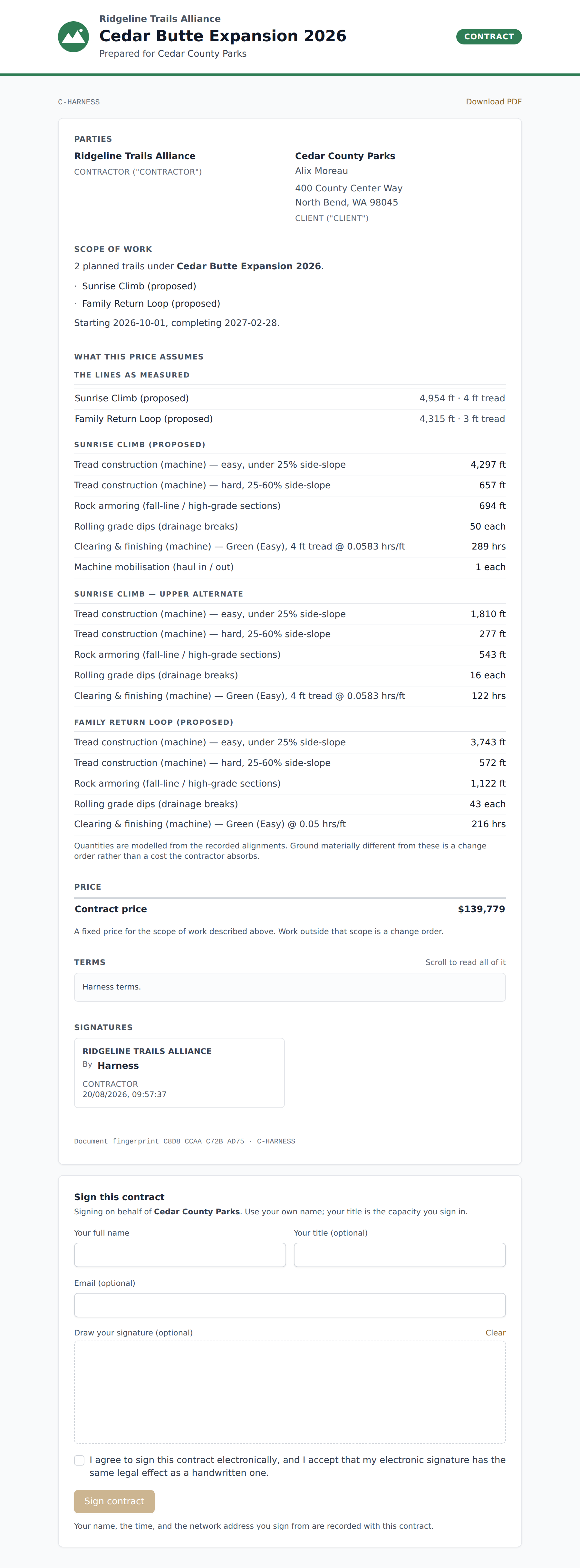
Every contract carries a short code near the bottom — something like A4F0 91C2 7B33 D019.
It is calculated from the document and the terms together, so any change to either produces a different one. Months later, it is how either side settles the only question a contract is ever really asked: is this the document that was signed? Two copies with the same fingerprint are the same contract. Two with different ones are not.
Your copy, as a file
Both sides get a Download PDF link — you on the project page, the client on their signing page, from the moment the contract goes out rather than only once it comes back signed. Somebody deciding whether to sign is exactly the person who wants to forward it to a partner or a lawyer first.
The file is built from the frozen document, so it does not change when the job does, and it carries two things the screen keeps short:
- The signing record — for each signature, the name, the email if one was given, the time, the address it was signed from, the device, and the sentence each party agreed to. It is printed on the document rather than kept only in our database, because a record only one side can produce is a weaker record.
- The full fingerprint — all sixty-four characters of it, not the short code.
From the field app
The moment a job is won is usually a conversation on the ground, so the whole flow is on the phone too. Open the project in the field app and a Contract section sits under the public proposal: prepare it, edit the payment schedule while you are still negotiating it, read it through, and sign it as the organization.
Then tap Client signs here. It shows a QR code — the client scans it with their own phone and signs there. That matters beyond convenience: the address and the device recorded against their signature are theirs, not yours borrowed for a minute.
The contract section needs signal every time, and says so when there is none. It is the one thing in the field app that is never read from the offline cache: what makes a contract worth anything is that both parties are looking at the same frozen document, and a stale copy on a phone is exactly how that stops being true.
Withdrawing one
A contract that has not been signed by the client can be withdrawn. The link stops working immediately.
It is withdrawn, not deleted — the record stays, with its fingerprint and your signature on it. "We never sent that" is a thing that gets said in a disagreement, and a contract that has been deleted cannot answer it.
A contract signed by both parties cannot be withdrawn or edited at all. Superseding one means sending another.